AI Is Helping Developers Build Alternatives to Adobe: Meet the New Generation of Creative Software
Introduction
For years, Adobe has been one of the leading names in creative software. Its applications are used by graphic designers, photographers, video editors, animators, and other professionals around the world.
However, professional creative software can be expensive, particularly for students, freelancers, and beginners who cannot afford recurring subscriptions. This has encouraged the development of alternative applications that provide similar tools without necessarily requiring users to purchase an Adobe Creative Cloud subscription.
Artificial intelligence is introducing a new possibility: developers can use AI coding assistants to build complex software more quickly. Projects such as ArtCraft, which has attracted attention for its collection of Adobe-inspired applications, illustrate this emerging approach.
But what exactly are these applications, how does AI help create them, and can they genuinely replace professional software?
What Is ArtCraft?
ArtCraft is a project associated with a collection of creative applications designed to offer alternatives to familiar professional tools. Its applications aim to cover areas such as image editing, vector graphics, video production, visual effects, and document publishing.
The project has attracted attention because of the reported use of AI-assisted development, including Anthropic's Claude coding capabilities, to help implement substantial parts of the software.
The idea is straightforward: instead of requiring a large development team to write every component manually, a developer can work with an AI coding assistant to generate code, implement features, troubleshoot errors, and accelerate development.
It is important to understand that AI-assisted development does not automatically make an application complete or reliable. Each feature still needs to be tested, and the resulting software must be evaluated on its own merits.
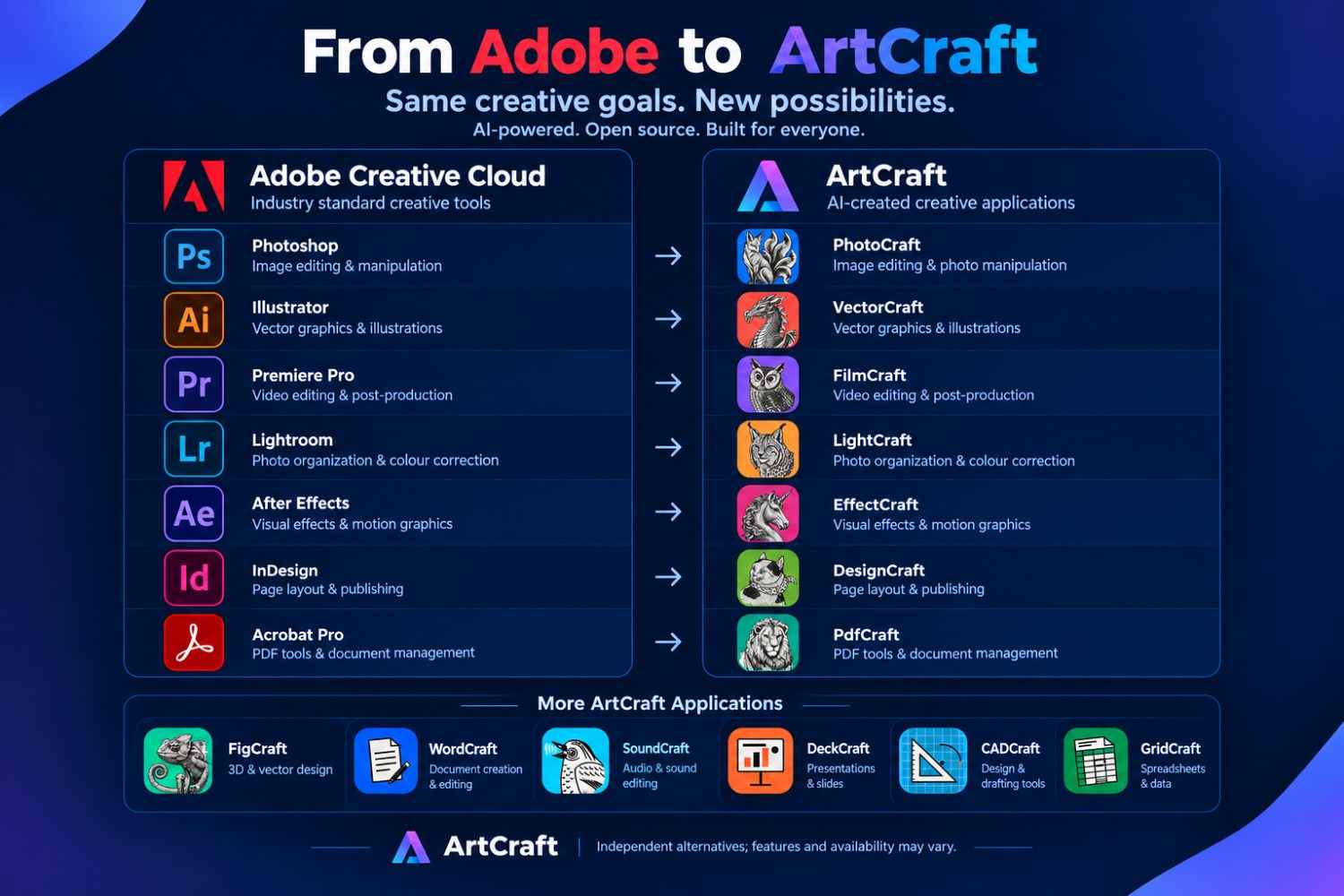
Creative Applications and Their Adobe Counterparts
The ArtCraft project has been discussed in connection with applications intended to serve purposes similar to those of established Adobe products.
| Application | Adobe counterpart | Intended purpose |
|---|---|---|
| PhotoCraft | Adobe Photoshop | Image editing, photo manipulation, and raster graphics. |
| VectorCraft | Adobe Illustrator | Vector illustrations, logos, and scalable graphics. |
| FilmCraft | Adobe Premiere Pro | Video editing and post-production. |
| LightCraft | Adobe Lightroom | Photo organization and image adjustments. |
| EffectCraft | Adobe After Effects | Motion graphics and visual effects. |
| DesignCraft | Adobe InDesign | Page layout and publishing. |
| PdfCraft | Adobe Acrobat Pro | PDF-related document tasks. |
Important: These comparisons describe the intended roles of the applications, not proof that each one offers all the features of its Adobe counterpart. Product names, availability, licensing, and current capabilities should be verified on the project's official website before downloading or relying on any application.
Official project information: ArtCraft Applications.
How Can AI Help Build Software Like Photoshop?
Applications such as Photoshop contain many interconnected systems. These include user interfaces, image-processing engines, layers, selection tools, filters, file-import systems, and export functionality.
Building a mature graphics editor from scratch is a substantial engineering challenge. AI coding assistants can help developers implement parts of such a system, although they do not eliminate the underlying complexity.
1. Understanding the Required Features
The developer begins by identifying what the application should do. For an image editor, this might include cropping, resizing, adjusting brightness, managing layers, and exporting images.
2. Designing the User Interface
An AI assistant can help generate interface code for menus, toolbars, panels, dialogs, and editing areas. The developer can then refine the layout and behaviour.
3. Generating the Code
AI coding tools can help write functions, connect application components, implement algorithms, and create supporting systems. Developers can request individual features and integrate them into the wider application.
4. Testing and Debugging
AI can help investigate error messages, suggest fixes, and generate tests. However, a developer must still verify that the fixes work and that one change has not broken another feature.
5. Improving Performance and Compatibility
Creative software must handle large images, complex projects, and different file formats. These requirements can be difficult to implement correctly. Profiling, real-world testing, and careful engineering remain essential.
The key lesson is that AI can accelerate software development, but generating code is only one part of creating a dependable application.
What Does AI-Assisted Development Mean?
AI-assisted development is an approach in which programmers use artificial intelligence tools to help write, understand, test, and maintain software.
One popular term for a related approach is vibe coding. It generally describes building software by expressing requirements in natural language and allowing an AI system to generate much of the implementation.
For example, a developer might ask an AI coding assistant:
Build a desktop image editor with an image canvas, cropping and resizing tools, brightness adjustments, and the ability to export images as PNG or JPEG files.
The assistant might generate an initial implementation. The developer can then run the program, identify missing features, report errors, and request improvements.
This workflow can help people create prototypes without manually writing every line of code. Nevertheless, a prototype is not the same as production-ready software. Complex applications require thoughtful architecture, security reviews where relevant, comprehensive testing, and ongoing maintenance.
Can These Applications Replace Adobe Creative Cloud?
The answer depends on what you want to do.
Alternative applications can be useful for experimentation, learning, and certain everyday creative tasks. However, they should not automatically be treated as complete replacements for established professional software.
Potential Advantages
- Lower costs: Applications with suitable free licences can reduce the financial barrier to entry.
- Learning opportunities: Beginners can experiment with creative tools without immediately committing to an expensive subscription.
- Developer contributions: Open-source projects can allow outside developers to inspect the code and contribute improvements, subject to the project's licence and contribution rules.
- New approaches: Smaller projects may experiment with interfaces and workflows that differ from established products.
- More choice: Users can evaluate alternatives and select tools that fit their needs and budgets.
Potential Limitations
- Missing features: An alternative may support basic editing but lack advanced professional capabilities.
- File compatibility: Complex PSD, AI, Premiere Pro, and other project files may not open correctly or preserve every editable element.
- Stability: Early-stage applications may contain bugs or behave unpredictably with complex projects.
- Performance: Large files, effects, and demanding workflows may reveal performance limitations.
- Support and documentation: New projects may have smaller communities and fewer learning resources.
Before switching, test an alternative with copies of your actual projects. Check export quality, file compatibility, stability, and whether it supports the tools you use regularly.
Does AI Make Software Developers Less Important?
Developments like these raise an important question: if AI can generate large amounts of code, will people still need to learn programming?
Programming knowledge remains valuable because software development involves much more than writing code. Developers must decide what to build, design systems, understand user requirements, identify errors, assess security risks, and verify that an application behaves correctly.
An AI assistant may generate a function that appears correct but fails under certain conditions. It might also introduce dependencies, inefficient algorithms, or compatibility problems. Without suitable testing and technical understanding, those problems can go unnoticed.
Developers who understand programming can use AI as a tool rather than relying on it blindly. They can explain requirements precisely, evaluate generated code, and make informed decisions about architecture and implementation.
For beginners, this means learning programming is still worthwhile. AI can make the learning and development process faster, but understanding the fundamentals helps you build better software.
How Beginners Can Use AI to Build Their Own Applications
You do not need to begin by building an entire Photoshop alternative. A smaller project is a more practical starting point.
Project Idea 1: A Simple Image Editor
Create an application that lets users upload an image, crop it, resize it, adjust brightness, and download the result.
Project Idea 2: A Browser-Based Design Tool
Build a web application where users can add text, shapes, and images to a canvas and export the final design.
Project Idea 3: A Basic Video Trimmer
Develop a tool that allows users to select a start time and end time, trim a video, and export the result.
Project Idea 4: A PDF Utility
Create a web application that combines PDF files, extracts selected pages, or converts supported images into PDF documents.
These projects provide opportunities to learn about user interfaces, file handling, image processing, application architecture, and testing.
AI Tools That Can Help
Depending on your programming experience and the type of application you want to build, you could explore AI coding assistants such as:
- Claude for discussing software architecture, generating code, and debugging.
- ChatGPT for learning programming concepts, planning features, and developing code.
- GitHub Copilot for AI-assisted coding within supported development environments.
These tools have different capabilities, limitations, and pricing arrangements. Check their current features before choosing one for your project.
Could AI-Created Software Create Business Opportunities in Ghana?
AI-assisted software development could create opportunities for Ghanaian developers, students, freelancers, and entrepreneurs.
Many individuals and small businesses need affordable digital tools. Some require image editors, document utilities, educational applications, design platforms, or software that addresses a specific local problem.
Instead of attempting to recreate an entire professional creative suite, a developer could focus on one problem and build a smaller application that solves it well.
Potential opportunities include:
- Affordable design tools for small businesses.
- Educational software for schools and training centres.
- Web-based image-processing tools for content creators.
- Document-management applications for organisations.
- Simple video and media utilities for social media creators.
- Specialised software designed around the needs of local businesses.
However, creating software is only the beginning. A sustainable product also requires a clear understanding of the target audience, reliable functionality, user support, maintenance, and a realistic business model.
Developers must also respect intellectual property rights, software licences, privacy requirements, and other applicable laws when building and distributing their products.
Is It Legal to Build an Alternative to Adobe Software?
Developing software that performs similar functions to an existing application is not automatically unlawful. However, the details matter.
Developers should create their own implementations, avoid copying protected source code or proprietary assets without permission, and review the intellectual property implications of their designs and branding.
They should also avoid misleading users into believing that an independent product is officially affiliated with Adobe. Names, logos, icons, interface assets, and other materials can raise separate legal questions depending on how they are used and the laws that apply.
Using AI to generate code does not automatically make a project legally safe. Developers remain responsible for reviewing their code, dependencies, licences, and distribution practices.
Final Thoughts
AI-assisted creative software projects demonstrate how artificial intelligence can help developers tackle ambitious programming tasks. Applications inspired by familiar creative tools may offer new choices for people who want to experiment, learn, or reduce software costs.
However, an application that resembles Photoshop or Premiere Pro is not necessarily equivalent to the established product. Its features, compatibility, stability, licence, and performance must be evaluated individually.
The wider lesson is that AI is changing how software can be built. Developers can use it to accelerate implementation and experiment with ideas that might otherwise take much longer to prototype.
For aspiring programmers, the opportunity is not simply to ask AI to copy existing applications. It is to learn how to use AI, programming knowledge, and careful testing to create useful products that solve real problems.
The next important software project might not come from a large technology company. It could come from a small team or an independent developer using AI to turn a practical idea into a working application.
Frequently Asked Questions
1. Are AI-created Adobe alternatives free?
Pricing and licensing depend on the individual application. Check the project's official website and licence before downloading or using it commercially.
2. Can these alternatives open Photoshop files?
Compatibility varies. Some applications may support certain formats, but complex files can lose layers, effects, fonts, or other editable elements. Test with copies of your files before switching.
3. Can AI build an application without a programmer?
AI can help people with limited programming experience create prototypes, but complex applications still require testing, technical decisions, debugging, and maintenance.
4. Should graphic designers stop using Adobe?
Not necessarily. Designers should select software according to their workflow, budget, required features, and compatibility needs. Established tools may remain the best option for some professional tasks.
5. Can I use AI to build my own alternative to Photoshop?
Yes, you can use AI coding assistants to help develop an image editor. Starting with a few well-defined features, such as cropping, resizing, and brightness adjustment, is more practical than attempting to reproduce every Photoshop feature at once.
Stay Updated with Eddycodegh
Follow Eddycodegh for more articles on artificial intelligence, programming, web development, creative technology, and useful digital tools.
Editorial note: This article discusses the broader trend of AI-assisted creative software development. Application names, feature sets, availability, and licensing can change. Verify current project details and test the software before relying on it for professional work.
Comments
0Sign in with Google to join the conversation.
Continue with GoogleNo comments yet. Be the first to comment!